Saturday, December 15, 2018

Update: MTG Doctor 13.1.0

In this releases of MTG Doctor we have added the following:

  • Ultimate Masters
  • Special Search Character.
  • Remove All from Decks.

Ultimate MasterMTG Doctor v13.1.0 now includes all the cards from the latest set Ultimate Masters. 


Ultimate Masters

Special Search CharacterMTG Doctor v13.1.0 allows you to use the // characters to specify a set of words that must be included in the card regardless of order.
Will find all the cards containing "damage" and "player" regardless of the order they appear in the card text.

Remove All From DeckMTG Doctor v13.1.0 now includes two additional options in the deck menu. Remove All Cards and Remove All But Lands which will remove all the cards in the main board or remove all the cards in the main board except lands.
Quickly clear your main board.
Have a Feature that you would like to see in MTG Doctor?
Go to the Extras screen and send us an email. We are constantly looking to improve MTG Doctor. Who knows? Your feature might just become a permanent part of MTG Doctor.

Special Thanks

Special thanks on this release go to:

  • Joshua Velez - For suggesting Ultimate Masters.
  • Adam Avery - For suggesting the special search feature.
  • Cody Taylor - For suggesting the remove all and remove all but lands feature. 


Sunday, January 14, 2018

Update: MTG Doctor 12.3.7

In this releases of MTG Doctor we have added the following:

  • Rivals of Ixalan
  • Minor bug fixes
Rivals of IxalanMTG Doctor v12.3.7 now includes all the cards from the latest set Rivals of Ixalan. 


Rivals of Ixalan Added


Have a Feature that you would like to see in MTG Doctor?
Go to the Extras screen and send us an email. We are constantly looking to improve MTG Doctor. Who knows? Your feature might just become a permanent part of MTG Doctor.

Special Thanks

Special thanks on this release go to:

  • lapoo the normal - For suggesting GBP conversion.

Sunday, November 19, 2017

Update: MTG Doctor 12.3.0

In this releases of MTG Doctor we have added the following:

  • Currency Support .
  • Default price selection for Trader and Wishlist
  • Minor bug fixes
Currency SupportAs of MTG Doctor v12.3.0 you may select the default currency you with to use. Once selected all the prices retrieved will be converted through out MTG Doctor to display the appropriate equivalent in the selected currency.  This can be accessed under settings under the Extras. 


Currently MTG Doctor supports USD and GBP.


Default PricingPrior to  MTG Doctor v12.3.0 the average price for the card would be used when performing a trade or creating a wishlist entry. As of MTG Doctor v12.3.0 you select which price is used by default.

Select the default pricing to use for Trader and Wishlist features.


Have a Feature that you would like to see in MTG Doctor?
Go to the Extras screen and send us an email. We are constantly looking to improve MTG Doctor. Who knows? Your feature might just become a permanent part of MTG Doctor.

Special Thanks

Special thanks on this release go to:

  • lapoo the normal - For suggesting GBP conversion.
  • Charles Love - For suggesting the ability to select pricing schemes to be used by Trader.

Monday, September 4, 2017

Update: MTG Doctor 12.2.0

In this releases of MTG Doctor we have added the following:

  • Collection validation on decks.
  • Multi-set Support
  • Minor bug fixes
Collection Validation SupportAs of MTG Doctor v12.2.0 you may now check your deck to see if you own enough copies to build it from your collection. 

 
By checking the collection validation your deck will not only be validated for the format but also whether it can be built with your current collection.

Multi-Set SupportAs of MTG Doctor v12.2.0 you may also individually control the amount of copies a card from a given deck. When you add different copies of the same card to your deck you'll see the new controls show up when editing the card amount. These controls allow you to cycle between each version to configure their amount individually.


Have a Feature that you would like to see in MTG Doctor?
Go to the Extras screen and send us an email. We are constantly looking to improve MTG Doctor. Who knows? Your feature might just become a permanent part of MTG Doctor.

Special Thanks

Special thanks on this release go to:

  • Earl West - For suggesting the ability to build decks using your collection.

Sunday, March 19, 2017

Update: MTG Doctor 12.1.16

In this releases of MTG Doctor we have added the following:
  • Deck Collection Indicator.
Deck Collection Indicator: As of MTG Doctor v12.1.16 you'll see the collection indicator along each card entry. The collection provides two conveniences: (1) information about how many copies of that card you own and (2) whether you own enough to have meet the demands of your deck. The collection indicator will turn green if you own at lease as many copies as you have in your deck. 

Collection indicator in action.

Have a Feature that you would like to see in MTG Doctor?
Go to the Extras screen and send us an email. We are constantly looking to improve MTG Doctor. Who knows? Your feature might just become a permanent part of MTG Doctor.


Special Thanks

Special thanks on this release go to:
  • Glenn - For suggesting a way to track cards you own during deck creation.

Monday, February 6, 2017

MTG Doctor - Privacy

Privacy Policy

MTG Doctor does not collect or store any kind of personal information. While MTG Doctor requests permission to access your camera it is in order to support the scanning feature and allow you to add cards to your deck using your device's camera.

For any and all questions regarding MTG Doctor please don't hesitate to reach out to us at GameDevelopersGuild@gmail.com

Wednesday, September 21, 2016

Update: MTG Doctor 12.1.10

In this releases of MTG Doctor we have added the following:
  • Improved Mana Curve
Improved Mana Curve: Mana Curve has been expanded to now also include the distribution of the colors per cost. This allows for additional distribution information to be glanced right away. Holding down on a given color section will further filter the cards and show only the ones that have the given color. 
Mana Curve for a White/Blue deck.


Have a Feature that you would like to see in MTG Doctor? Go to the Extras screen and send us an email. We are constantly looking to improve MTG Doctor. Who knows? Your feature might just become a permanent part of MTG Doctor.

Special Thanks


Special thanks on this release go to:
  • Kevin Johnson - For suggesting the Mana Curve improvements.

Update: MTG Doctor 12.1.0

In this releases of MTG Doctor we have added the following:
  • Kaladesh - Cards added.
  • Energy Tracker - Battle helper now tracks energy
  • Android Wear - Support for android wear.
Kaladesh - Cards added: Latest cards from Kaladesh have been added into MTG Doctor. 
Kaladesh Set


Energy Tracker: Battle Helper Nexus has been expanded to support Energy counters. You may now track energy along with life points and all the other trackers currently supported.


Energy tracker support has been added.


Android Wear: What better way to welcome a technology based set than adding some new technology to MTG Doctor. For this release we have added our initial support of Android Wear. If you have an Android Wear device connected the next time you open the Battle Helper you will see your trackers displayed on your wear device. This will allow you to keep track of your life points and energy counters without having to reach for your phone. 


Battle Helper on Square Face.

Have a Feature that you would like to see in MTG Doctor? Go to the Extras screen and send us an email. We are constantly looking to improve MTG Doctor. Who knows? Your feature might just become a permanent part of MTG Doctor.


Special Thanks


Special thanks on this release go to:
  • Mudd Guy - For suggesting the Energy trackers.

Saturday, July 23, 2016

Update: MTG Doctor 12.0.8 & 9

In this releases of MTG Doctor we have added the following:
  • Eldritch Moon - Cards added.
  • Eldritch Moon - Intro decks added
Eldritch Moon - Cards added: Latest cards from Eldritch Moon have been added into MTG Doctor. 

Cards from Eldritch Moon now available


Eldritch Moon - Intro decks added: All the intro decks from Eldritch Moon are now available for analyzing and modifying. 

All intro decks from Eldritch Moon available.

Saturday, June 18, 2016

Update: MTG Doctor 12.0.0

In this release of MTG Doctor we have added the following:
  • Battle Helper Nexus.
  • Pauper Legality Checker.
  • Copy deck to clipboard
  • Integration with TutorCards (https://tutor.cards/)
Battle Helper Nexus: We have revamped the Battle Helper and developed a whole new one. This version introduces Battle Helper - Nexus, with a whole new layout as well as better support for Commander. This new Battle Helper includes support for up to six player as well as Commander and 2HG play styles. 

Note: +5/-5 buttons have been replaced with left-to-right and right-to-left gestures.

New layout presents same information as previous BH version but better laid out. In two player mode the opposing player's panel will be inverted (Android Honeycomb and Up)
To access the options simply touch the Gear icon.
Up to 6 players can be supported at the same time. Commander and 2HG play formats are also supported.
Selecting Commander starts the players with 40 life and commander counter is displayed.
Defeated player is highlighted. 

Pauper Legality Checker: You may now validate your deck for Pauper format. 
Pauper deck legality checker. 
Copy Deck To Clipboard: We have also included a feature to allow you to copy your deck into your clipboard so you can then paste it on other apps. 

Copy the deck to the clipboard to share on other sites. Simply go where you want to share it and paste it.
 Integration with TutorCards: We have integrated TutorCards to allow for ease of searching or adding cards to deck by taking a picture of the card.

Touch the 'Scan Card' button to bring up your camera and scan your card.

Have a Feature that you would like to see in MTG Doctor? Go to the Extras screen and send us an email. We are constantly looking to improve MTG Doctor. Who knows? Your feature might just become a permanent part of MTG Doctor.

Special Thanks


Special thanks on this release go to:
  • Randy Maley - For suggesting the Pauper legality checker.
  • David Tingle - For suggesting the copy to clipboard feature.
  • Cameron Rushing - For suggesting the scan card feature.
  • Chris Davola - For suggesting the scan card feature.
  • Dew Petteplace - For suggesting the scan card feature.
  • Michael Hagstrom - For suggesting the scan card feature.
  • Rwicha - For suggesting the scan card feature.
  • Deserae Blevins - For suggesting the scan card feature.
  • Danny Mor - For suggesting the scan card feature.

Saturday, May 7, 2016

Update: MTG Doctor 11.1.0

In this release of MTG Doctor we have added the following:
  • Share deck over Facebook as image.
  • Share deck over Facebook as text format.
Share Deck on Facebook: The Facebook policy prevents us from pre-populating a user posts. In order to still allow you to share your decks, the default format was chosen to be a picture. However, we still allow you to by loading the deck onto the clipboard so you may paste it onto your wall.


Facebook share will now appear on your Options menu.

By default the deck will show up as an image to be shared on your wall. 

Deck shared over Facebook as image.

Decks are also loaded to your device clipboard, this means that they can be pasted on your post. 

Deck shared on Facebook in text format.

Special Thanks

Special thanks on this release go to:
  • David Tingle - For suggesting the share on Facebook feature.

Saturday, April 2, 2016

Update: MTG Doctor 11.0.16


In this release of MTG Doctor we have added the following:
  • Cards from Shadows over Innistrad.
  • All intro decks from Shadows over Innistrad.
  • New UI language and renaming of Save button to Options.
Cards from Shadows over Innistrad: Includes all the cards from the Shadows over Innistrad set. 
Shadows over Innistrad Cards
Intro decks from Shadows over Innistrad: All intro decks from Shadows over Innistrad are available for analysis and editing.


Intro decks from Shadows over Innistrad

New UI language and renaming of Save button to Options: We have renamed the 'Save' button in the Detailed Deck View to 'Options'. At the same time we have begun to introduce a new UI language to MTG Doctor. In MTG Doctor we have always tried to make the most out of the existing screen realstate and reduce the number of buttons in order to make the experience simpler. In order to accomplish this we make great use of the Long Press functionality in Android. As of this version buttons which support Press as well as Long Press will be shown as bold and italic. The first of these button is our Options buttons.

Options Button Functions:

  • Press - Pops up save deck menu. 
  • Long Press - Pops up the sort deck menu.

Options button is Bold and Italic which means it supports both press and long press.
On press of the 'Options' button the 'Save Deck' menu pops up.
On long press of the 'Options' button the 'Sort Deck' menu pops up.

Special Thanks

Special thanks on this release go to:
  • Stuart Peck - For suggesting the sort deck feature.

Tuesday, January 19, 2016

Update: MTG Doctor 11.0.0


In this release of MTG Doctor we have added the following:
  • NFC Deck Transfer.
  • Google Drive Integration.
  • Support for Colorless Mana.
  • Cards from Oath of the Gatewatch.
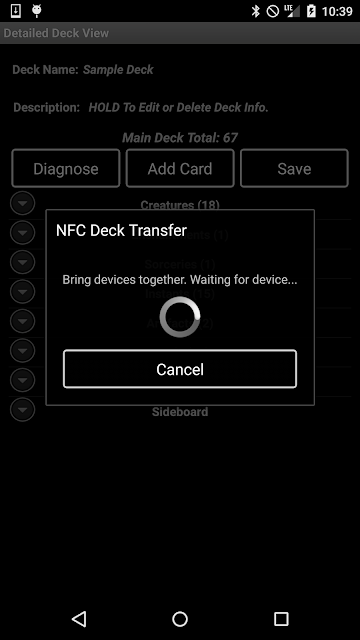
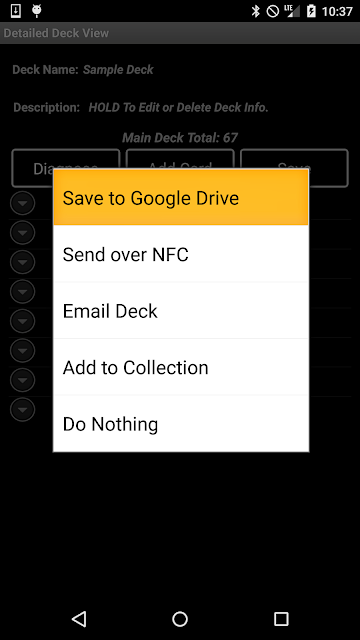
NFC Deck Transfer: Transfer your deck using Near Field Communication (NFC) technology. This version of MTG Doctor allows you to transfer decks between devices by bringing them together back to back. This allows for easy transfer of decks even when in places where connectivity is less than favorable. In order to access this new option simply hold down the 'Save' button on the deck view.

Note: This feature requires Android 4.0+ for it to work. If you have an earlier version of Android do not worry, MTG Doctor will still function but this feature will not be available. 
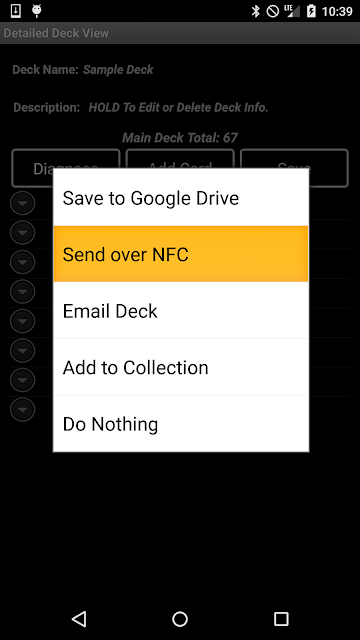
To begin transfer simply select the option on the save menu.

Once the transfer dialog appears place both devices back to back to initiate transfer.

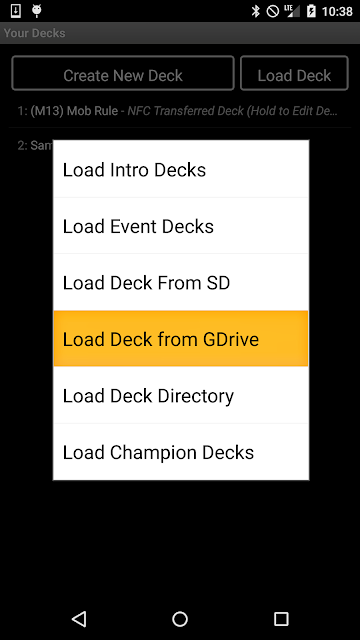
Google Drive Integration: As of this version of MTG Doctor you will be able to Save and Load decks straight out from your Google Drive. This new feature supports all deck formats previously supported in MTG Doctor for decks:

  • DEK - .dek 
  • DEC - .dec 
  • TXT - .txt
  • Wagic - .wgc
  • MTG Doctor CSV - .dcsv
Select the 'Save to Google Drive' option to access google drive and store your deck.

Select the 'Load Deck from GDrive' option to load your deck from your Google Drive.

Support for Colorless Mana: As of Oath of the Gatewatch the distinction between colorless Mana and generic Mana cost have been more more clear with the addition of their own Mana symbol and cards that produce colorless Mana. This version of MTG Doctor has been updated to properly reflect these changes and improve the calculation algorithms to support it. 

Colorless Mana symbols will now be included in the Mana Calculations.

Lands producing colorless Mana will be reflected with Gray color.  

Oath of the Gatewatch: This version of MTG Doctor includes references to all the new cards from the latest set Oath of the Gate Watch. 
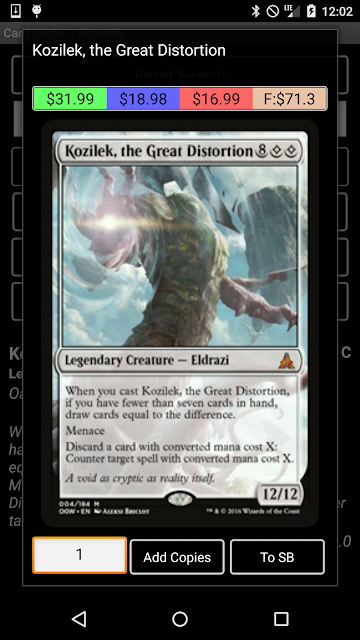
Oath of the Gatewatch

Special Thanks

Special thanks on this release go to:
  • Lian Alvarez - For suggesting of cloud support (Google Drive).

Sunday, December 13, 2015

Update: MTG Doctor 10.6.13

In this release of MTG Doctor we have added the following:
  • New Deck Format:  Added support for CSV files for load and storing decks.
New Deck Format: As of this version of MTG Doctor you will be able to save and load files saved with the (.dcsv) extension. This is the MTG Doctor CSV format which you can then take and import into Excel or any other program. The format for DCSV files is: Card Amount, Card Name, Multiverse Id. Where sideboard entries are separated from the deck entries by an empty line ",,".

Note: In order to save your deck using this new format simply append the extension ".dcsv" at the end of the file name when saving your deck in MTG Doctor.

MTG Doctor recognizes .dcsv files when loading.

Special Thanks

Special thanks on this release go to:
  • Bole Aganja - For suggesting the new format.

Sunday, December 6, 2015

Update: MTG Doctor 10.6.12

In this release of MTG Doctor we have added the following:
  • Feature:  Offline Sets
  • Improvement: Fixed a couple of bugs with loading card images.


Offline Sets (Extras): As of this version of MTG Doctor you will be able to download all the card images for a given set and have them available even when you have no connectivity. This will allow you to create decks and reduce your data footprint. You may find this new feature under the Extras menu.

Note: Images will take space on your device so make sure that you have plenty of space available. MTG Doctor also allows you to clear a given set which will remove all downloaded images. This will allow for better management of the space and let you get rid of sets you no longer need in favor of ne ones.


Card images are downloaded on a set by set basis to allow full control of  what sets to keep.

When a set is already downloaded the action will change from "Download" to "Clear" thus allowing removal of the set if no longer wanted around.

Sets can be cleared to free up space and make room for newer sets.

You will find this new feature on the Extras menu.

Special Thanks

Special thanks on this release go to:
  • Anthony Zolman - For suggesting the offline sets feature.
  • Bole Aganja For suggesting the offline sets feature.
  • Jonanth Lamb - For suggesting the offline sets feature.
  • David Tingle - For suggesting the offline sets feature.

Sunday, July 26, 2015

Update: MTG Doctor 10.6.3

In this release of MTG Doctor we have added the following:
  • Feature: MTG Core Rule Set.
  • Improvement: Added more search filters to Card Finder - Phoenix.

MTG Core Rule Set: As of this version of MTG Doctor you can access the MTG rules through the 'Extras' section of MTG Doctor. 


MTG Rules accessible through the 'Extras' section.

Rules topics with nested subtopics.

Rules are displayed with sub-rules nested right bellow them.


More Search Filters: We have added new ability to filter by card Power and/or Toughness. As of these version we also grouped many of the filters into the 'Extra Filter' section to make the UI simpler and exposed most commonly used filters.

To see all filters simply press the "Show Extra Filters" button.

All filters shown. When a filter is used the 'Extra Filters' button will be highlighted. 

Extra filter collapsed but still active as shown by the highlighted "Show Extra Filters" button.


Have a Feature that you would like to see in MTG Doctor? Go to the Extras screen and send us an email. We are constantly looking to improve MTG Doctor. Who know? your feature might just become a permanent part of MTG Doctor.

Special Thanks

Special thanks on this release go to:
  • Emanuel Morris - For the suggestion of adding comprehensive rules.
  • Anthony Zolman - For suggesting the expansion to the search feature.
  • Joel Barnette - For suggesting the expansion to the search feature.
  • Thunder wolf - For suggesting the expansion to the search feature.
  • Brandon Valenzuela - For suggesting the expansion to the search feature.