Sunday, March 16, 2014

Update: MTG Doctor 10.1.0

In this release of MTG Doctor we have added the following:

  • Added context menu to allow for easy duplication of decks.
  • Added context menu to allow setting of commander. 
  • Corrected bug causing deck crashes on some commander decks.


Duplicate Deck: On Long Press (Hold) of a deck on the Decks view a context menu will appear which allows you to duplicate your decks.

The old functionality of Hold has been moved to the "Update / Delete Deck" choice.


Set Commander: MTG Doctor will continue to detect the commander in your deck for your. When multiple Legendary creatures are added to a deck MTG Doctor evaluates and attempts to select the commander best suited for the deck. The evaluation algorithm is currently in Beta so we have also provided you with tools to manually select the commander for your deck in the instances that MTG Doctor fails to select the correct commander. The menu is only shown if your deck is a commander deck and the card being held is a Legendary creature. If any other card is held, nothing will appear.


When holding a Legendary card down, the commander context menu will pop up. This will only happen if your deck is a commander deck.


A Commander can also be unset, this will revert the deck to the Commander selected by MTG Doctor.

Bug Fix: Corrected bug causing some crashes on Commander decks. 

Have a Feature that you would like to see in MTG Doctor? Go to the Extras screen and send us an email. We are constantly looking to improve MTG Doctor. Who know? your feature might just become a permanent part of MTG Doctor.

Special Thanks

Special thanks for suggesting the collection feature on this release go to:
  • Cody Taylor - For suggesting the deck duplication.
  • Lance Lavanway - For suggesting the manual setting of commanders.

Thursday, March 6, 2014

Extras: Collection


Collection Feature: As of MTG Doctor 10.0.0 you can keep track of your entire collection. It tracks your completion on a set basis.
Easily see the completion rate of each set.

Color coding helps to easy see what cards you have and what cards you are missing.


Long Press: On the set view, hold down the set name on top of the card list to reset your collection.

Hold the set name to reset the collection for a given set.
Resetting set.


Special Thanks

Special thanks for suggesting the collection feature on this release go to:
  • Thomas Tingey
  • James Watts
  • Christian Gelet
  • Steven Bean
  • Nathaniel Newman 

Wednesday, February 26, 2014

Update: MTG Doctor 10.0.0

In this release of MTG Doctor we have added the following:

  • Added collection feature.


Collection Feature: As of MTG Doctor 10.0.0 you can keep track of your entire collection. It tracks your completion on a set basis.
Easily see the completion rate of each set.

Color coding helps to easy see what cards you have and what cards you are missing.


Long Press: On the set view, hold down the set name on top of the card list to reset your collection.

Hold the set name to reset the collection for a given set.
Resetting set.


Special Thanks

Special thanks for suggesting the collection feature on this release go to:
  • Thomas Tingey
  • James Watts
  • Christian Gelet
  • Steven Bean
  • Nathaniel Newman 

Saturday, February 1, 2014

Update: MTG Doctor 9.2.20

In this release of MTG Doctor we have added the following:

  • Updated database to include cards from set: Born of the Gods
  • Added all intro decks for set: Born of the Gods


Database Updated: Added all the cards from Born of the Gods.

Born of the Gods cards added.

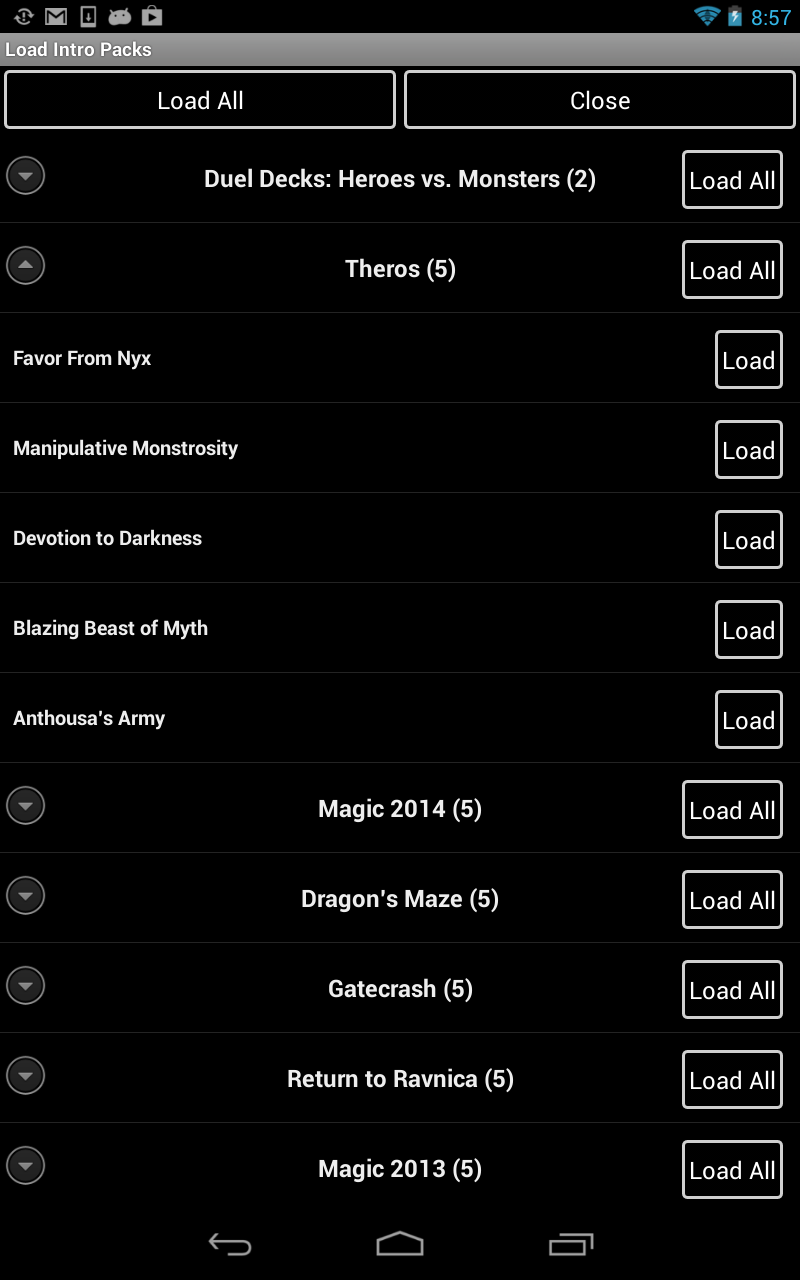
Decks Added: Added all duel decks and all intro decks for Born of the Gods. This is an extension to the the load intro decks features.

Added all intro decks for Born of the Gods.

Special Thanks

Special thanks on this release go to:
  • Code Taylor - For the reminder to add the Born of the Gods set.

Saturday, December 21, 2013

Update: MTG Doctor 9.2.16

In this release of MTG Doctor we have added the following:

  • Added all Duel Decks.
  • Added all intro decks for Commander 2013
  • Corrected bug with Wishlist and Trader Feature.

Decks Added: Added all duel decks and all intro decks for Commander 2013. This is an extension to the the load intro decks features.

Commander 2013 and duel decks can now be loaded.
Bug Fix: Corrected bugs with the Wishlist and Trader feature which prevented the selection of the proper set when picking the list from the drop down.  Picking a the card now correctly selects the set.
Corrected bug on the Wishlist and Trader feature.

Special Thanks

Special thanks on this release go to:
  • Kale Mills - For suggesting the addition of the Commander 2013 intro decks.
  • Mike Ramirez: For pointing out the bug on the Wishlist and Trader features.

Thursday, November 28, 2013

Update: MTG Doctor 9.2.15

In this release of MTG Doctor we have added the following:

  • Added initial support for Commander/EDH
  • Added Legality checking for Commander/EDH decks.
  • Corrected Land suggestion feature to account for Commander/EDH decks.

Support for Commander/EDH decks: As of this version MTG Doctor analyses your deck to detect if it is a Commander/EDH deck. At the moment a deck is considered to be a Commander deck if the deck size is more than 50 cards and every card has only one copy. When a deck is recognized as Commander/EDH the Commander will appear at the top of the creatures list, all other creatures will continue to display in alphabetical order.  This is an extension of the Deck View feature.

Sedris, the Traitor King is the commander for the deck.

Legality checking for Commander/EDH decks: Decks can now be validated for commander compliance. This is an extension of the Deck Legality feature. The legality checker looks for the following to validate your commander deck:
  • Commander: If the deck has no commander the deck will be considered invalid.
  • Singleton: If any of the cards in your deck has more than one copy it will fail validation.
  • Colors in Commander: If any of the cards in your deck contains a color that is not part of your commander, it will fail validation.
  • Deck Size: Commander/EDH decks must be exactly 100 cards in size. If the decks has more or less card it will fail validation.
  • Banned Cards: If any card in the deck is banned, the deck will fail validation.
  • Restricted Cards: If any card in the deck is restricted, the deck will fail validation.
Some error messages can be touch for quick fixing.

Corrected Land suggestion feature: If a deck is recognized as a Commander/EDH deck. The land suggestion feature will take the 100 card limit when generating a suggestion of lands for your commander deck. This is a modification to the Suggested Land Distribution feature.

For Commander/EDH decks the card limit of 100 is taking into account when suggesting lands.


Special Thanks

Special thanks on this release go to:
  • Chris Bowden - For suggesting the Commander/EDH feature as well as sending us his deck for testing.
  • Michael Ramirez: For suggesting the Commander/EDH features.
  • Ujjimbo: For suggesting the Commander/EDH features.
  • Christopher Rodriguez: For suggesting the Commander/EDH features.
  • Steven Bean: For suggesting the Commander/EDH features.

Monday, November 25, 2013

Update: MTG Doctor 9.2.14

In this release of MTG Doctor we have added the 167 Theme Decks from past sets. You can now load preconstructed decks going all the way back to Tempest.

Sets Added:
  • Alara Reborn
  • Betrayers of Kamigawa 
  • Champions of Kamigawa
  • Coldsnap
  • Conflux
  • Darksteel
  • Dissension
  • Eventide
  • Exodus
  • Fifth Dawn
  • Future Sight
  • Guildpact
  • Invasion
  • Judgement
  • Legions
  • Lorwyn
  • Mercadian Masques
  • Mirrodin
  • Morningtide
  • Nemesis
  • Odysey
  • Onslaught
  • Apocalypse
  • Planar Chaos
  • Planeshift
  • Prophecy
  • Ravnica: City of Guilds
  • Saviors of Kamigawa
  • Scourge
  • Shadowmoor
  • Shards of Alara
  • Stronghold
  • Tempest
  • Time Spiral
  • Torment
  • Urza's Destiny
  • Ursa's Legazy
  • Urza's Saga 
  • Worldwake
  • Zendikar

Duel Decks:
  • Heroes vs. Monsters


LONG PRESS: In My Decks view  hold the Load Deck button to access the Theme Decks loading menu. Then select the decks you want to load.
Load Theme/Intro decks going back to Tempest


Special Thanks

Special thanks on this release go to:

  • Colin Stevens - For suggesting the load them/intro decks feature.
  • Chris Spousta- For suggesting the addition of Duel Decks: Heroes vs. Monsters.